Job management for Australian trades
Enquiry to invoice, without the double handling.
A customer's enquiry becomes the job, the quote, the booking, the certificate and the invoice. Nobody types anything twice. The office runs it on the computer, the crew runs it on their phones.
Free during the beta. No card needed to join.
- EnquiryFrom your website
- QuotedFrom your price book
- AcceptedOn her phone
- BookedOn Dan's week
- On siteTimer and photos
- CertifiedSigned on the phone
- InvoicedInto Xero
- Connects to Xero
- App, database and your files kept in Sydney
- Works on iPhone and Android, from the home screen
- No lock-in contract
- Made on the Gold Coast
What's included
Certificates built in
Works with no signal
Know what each job made
Free during the beta
Follow one job
A smoke alarm upgrade, start to finish.
A demo business on the real app: Sarah is the customer, Dan is the tech. Every screen below is exactly what you and your customer would see.
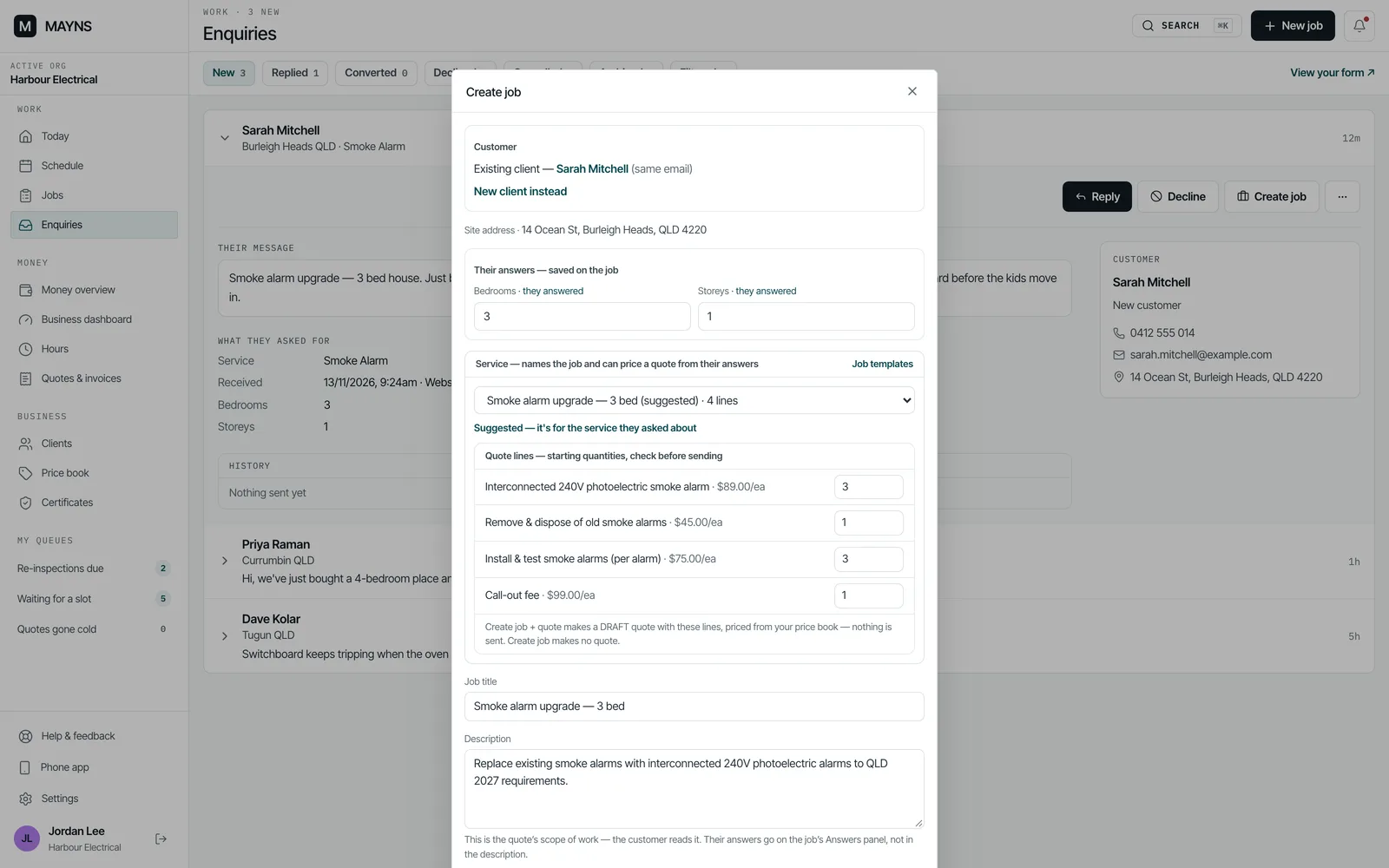
01 · Enquiry
Take the jobs you want. Leave the rest.
Sarah fills in the enquiry form on your website. Like the look of it? One click makes her a client, makes the job and drafts the quote from your usual prices. Not for you? Decline it.
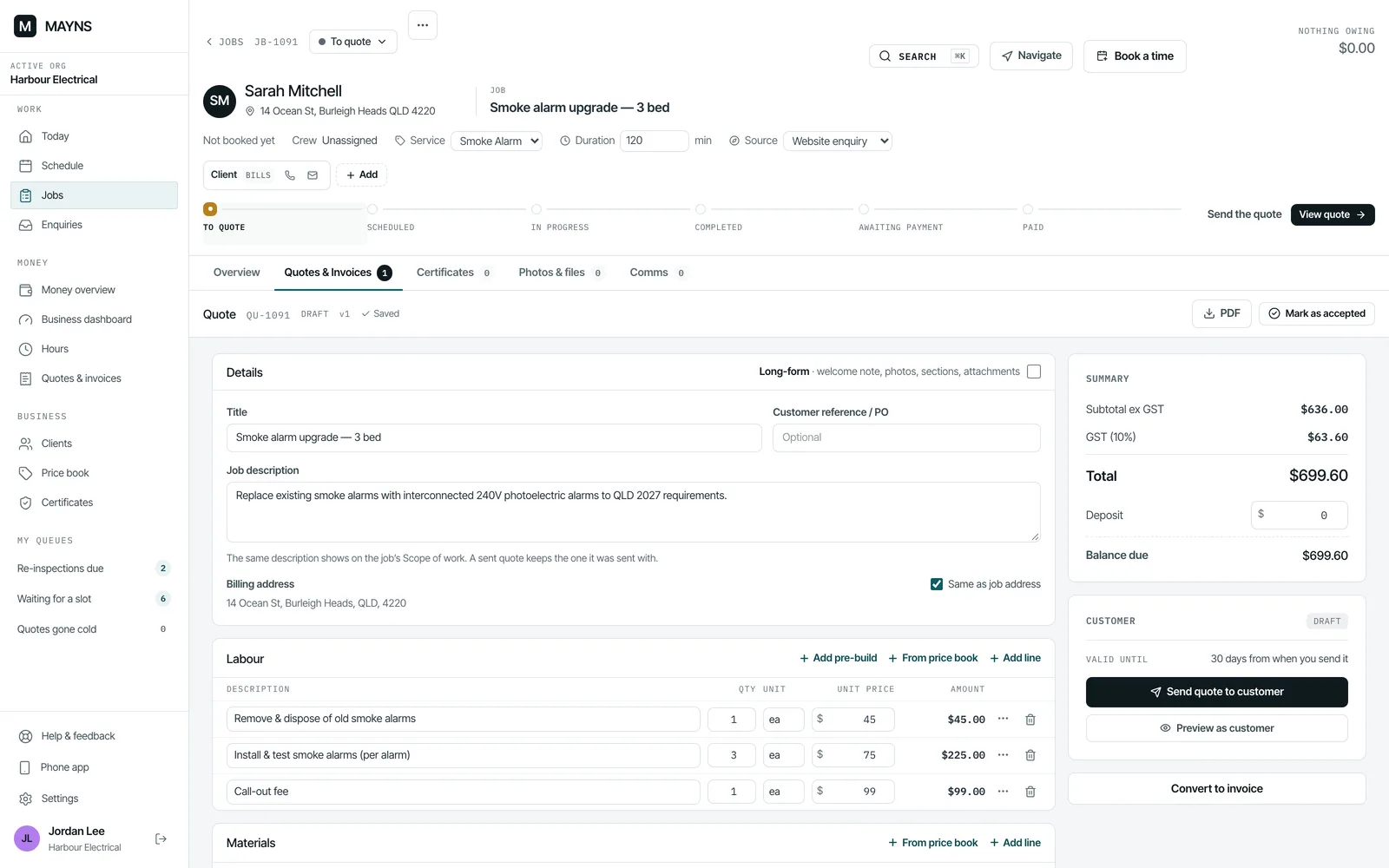
02 · Quote
Quote out the same day.
Lines come from your price book or a job template, and the GST is worked out for you. Give the customer options to choose from, and ask for a deposit when the job needs one.
Your logo, ABN and licence print on it once they're in your settings.
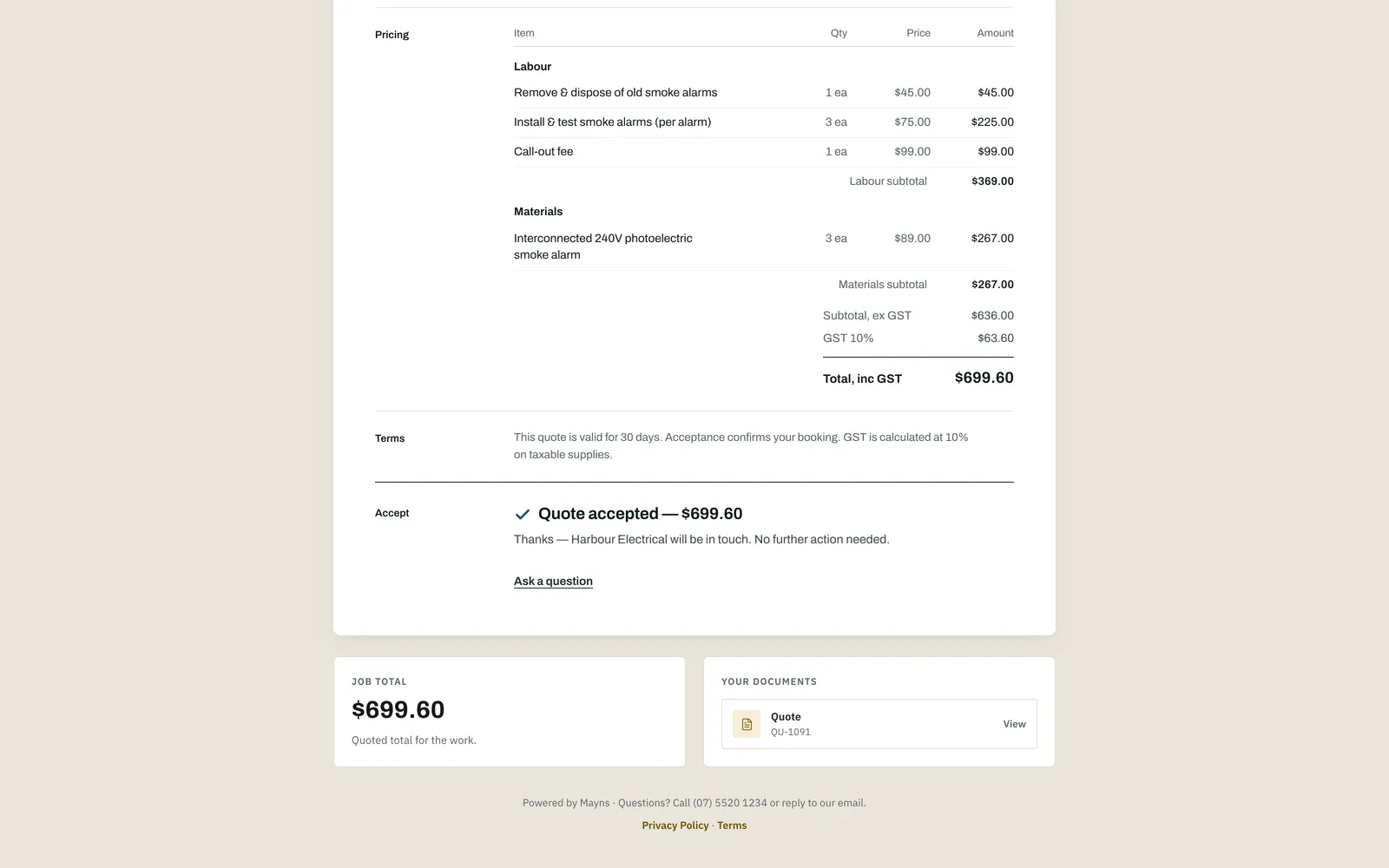
03 · Accepted
She says yes from her phone.
Sarah opens the link, reads the quote and accepts it with her name and signature. You see it on the job straight away, and she gets an email confirming what she accepted.
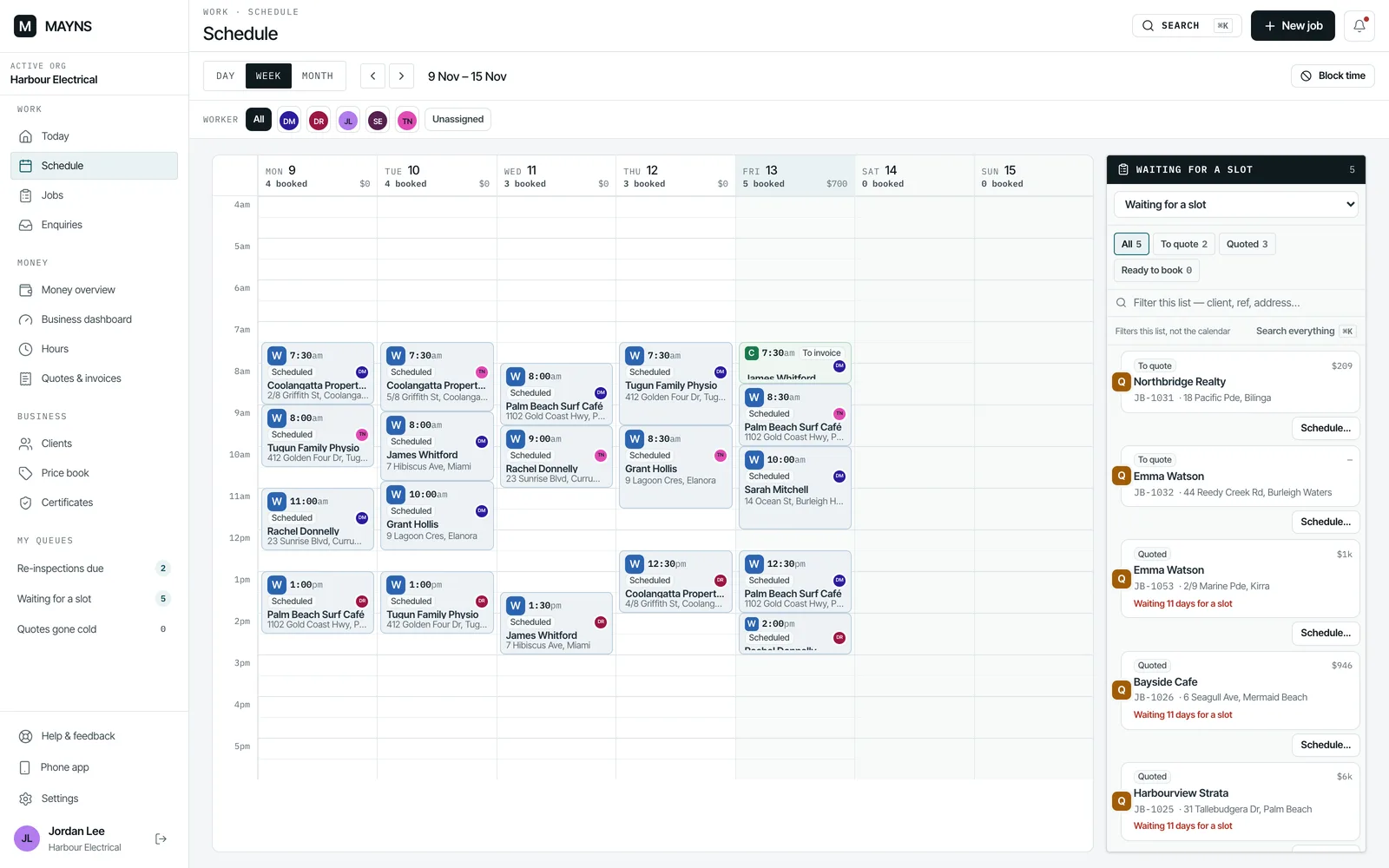
04 · Booked
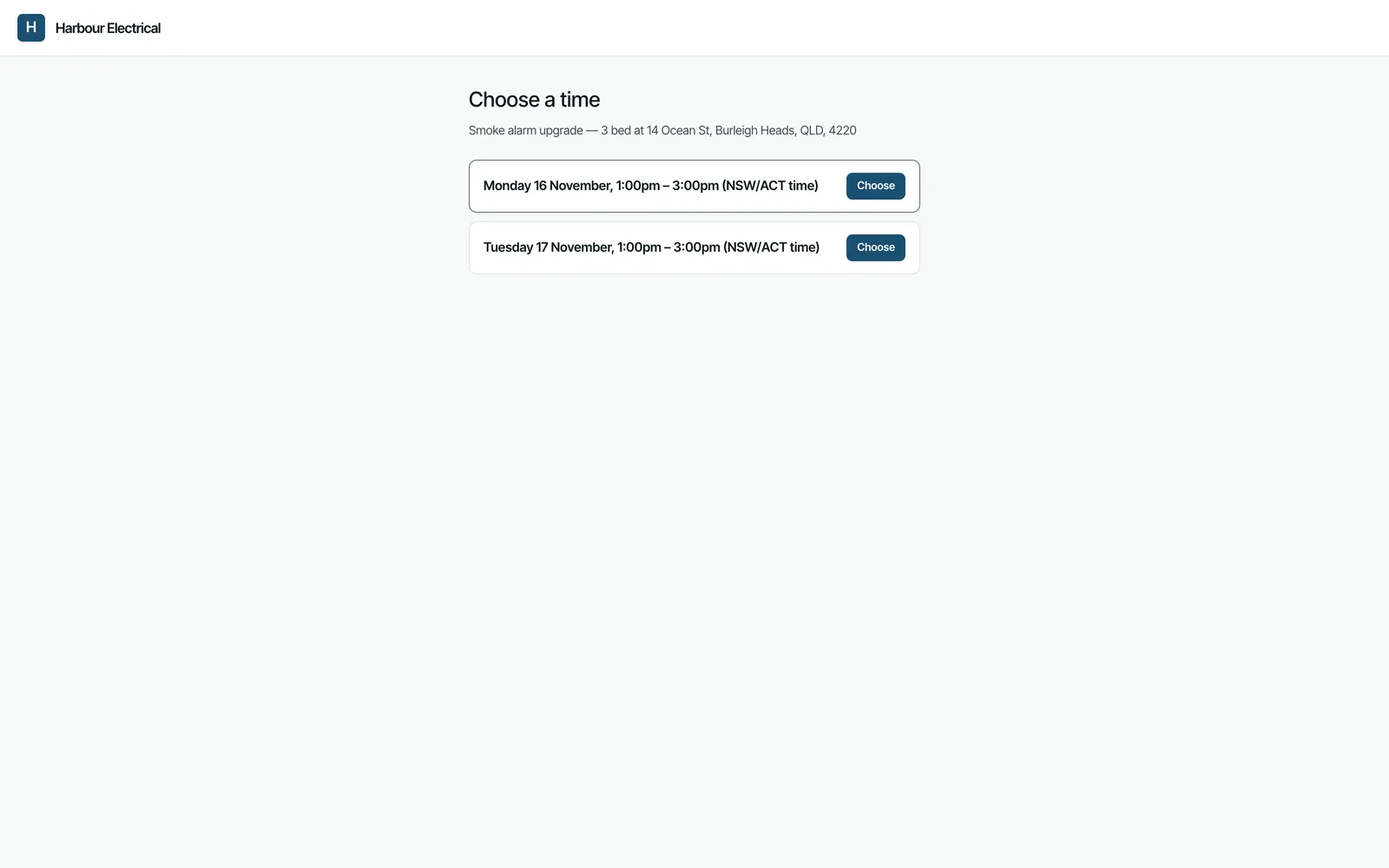
Book it in, or let her pick from your times.
Drop the job on someone's week. Or send Sarah a few times that suit you and she picks one. She can only choose from what you offered.
05 · On site
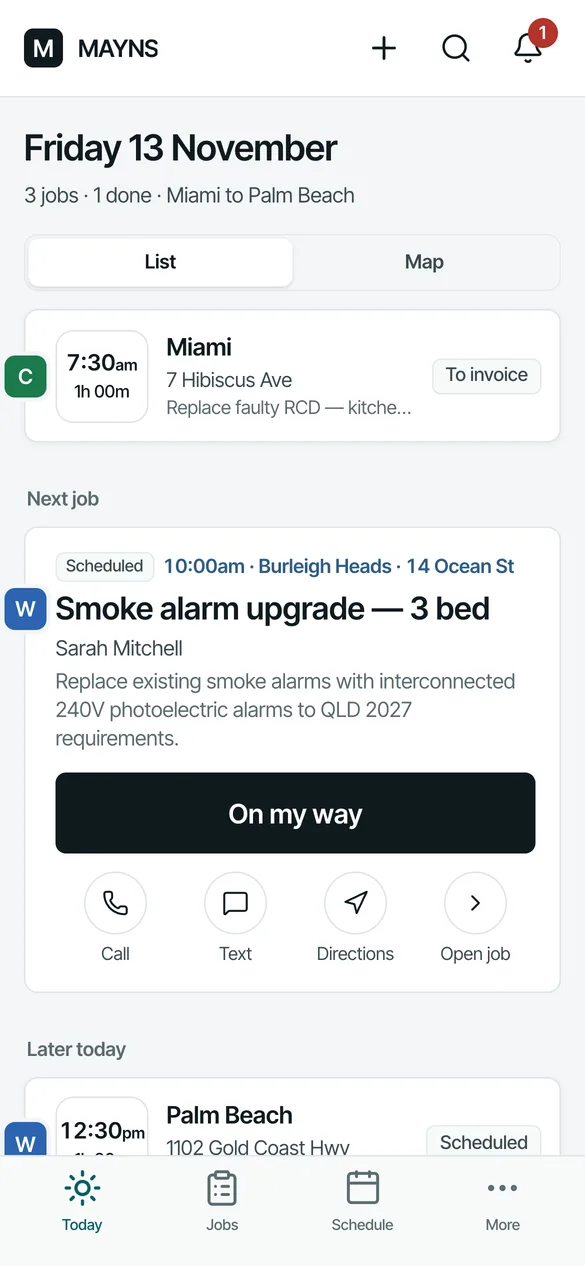
Dan runs his day from his phone.
His jobs are in order with drive times. One tap opens a text to Sarah saying he's on the way, another starts the timer. Notes and photos go straight onto the job.
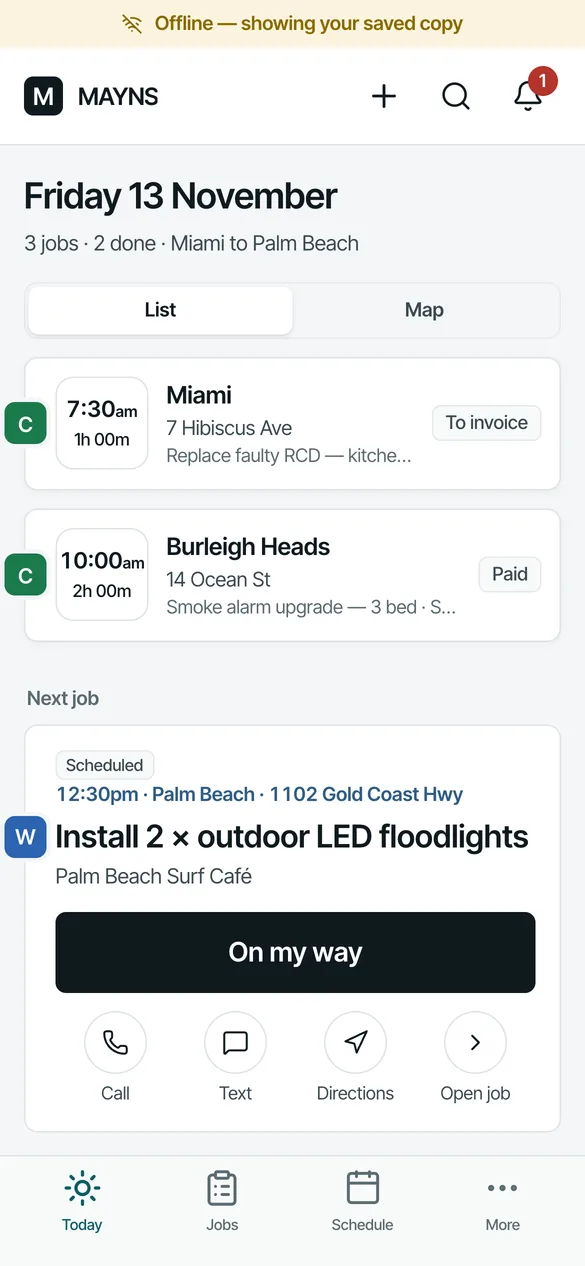
Up in the roof with no signal, the job is still on his phone. What he does is saved there and sent when he's back in range. What works offline.
06 · Certificate
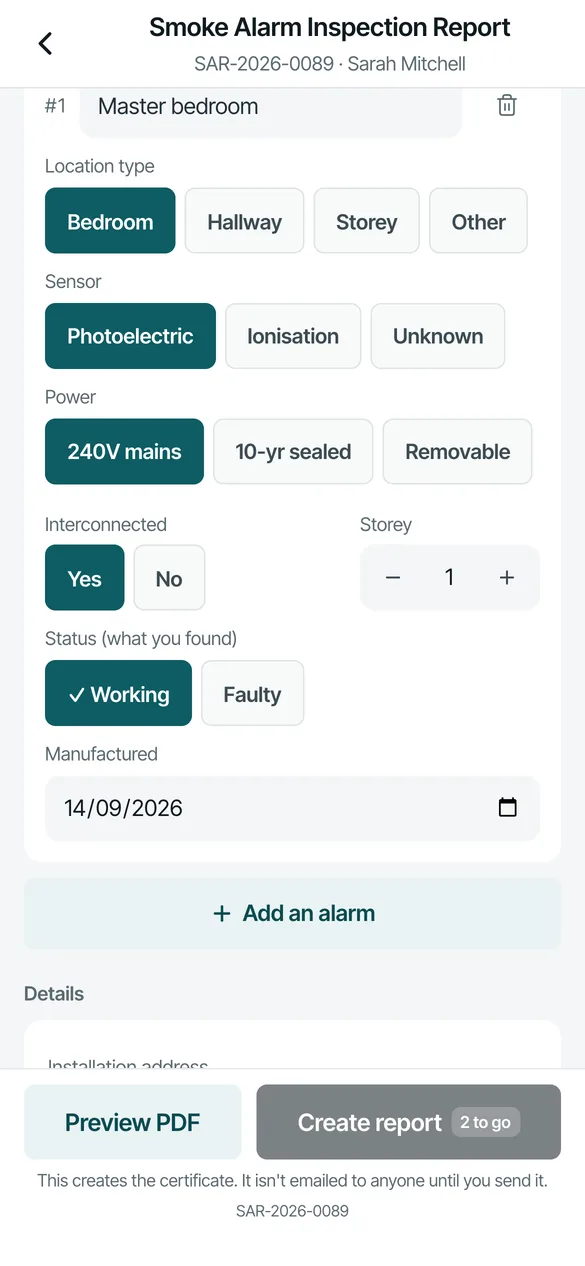
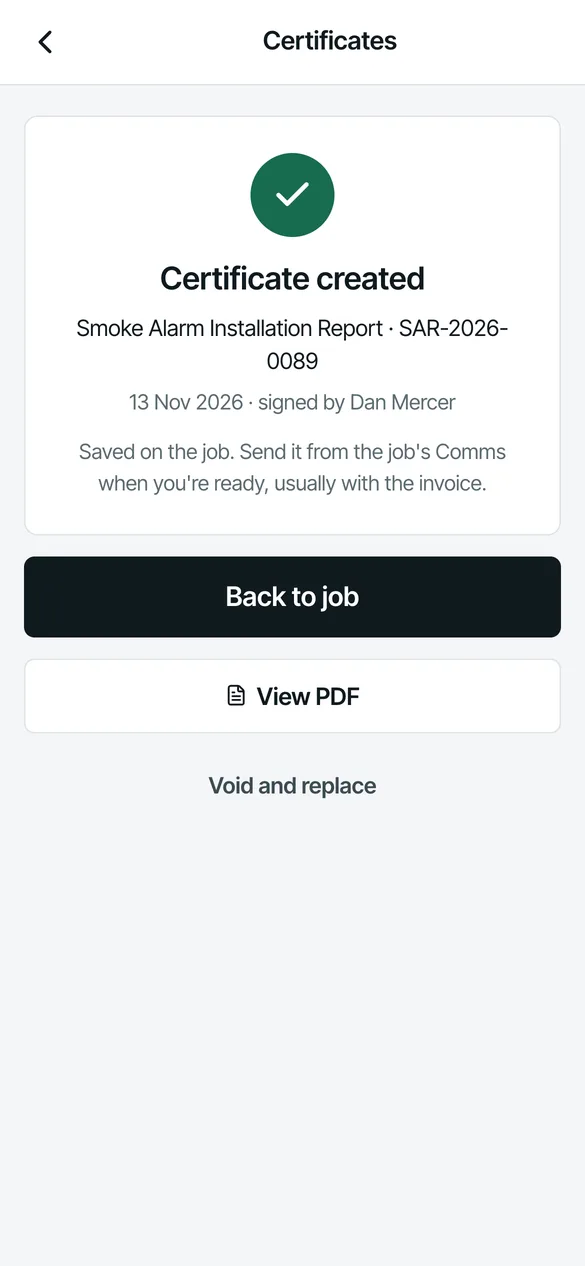
The certificate's done before he packs up.
Alarm by alarm: where it is, photoelectric or ionisation, hardwired or battery, interconnected, working. He signs on the screen and creates it. It's filed on the job with your licence number for the state, and you send it to Sarah when you're ready.
Mayns issues the QLD smoke alarm report and the QLD Certificate of Compliance. What's covered.
07 · Invoice
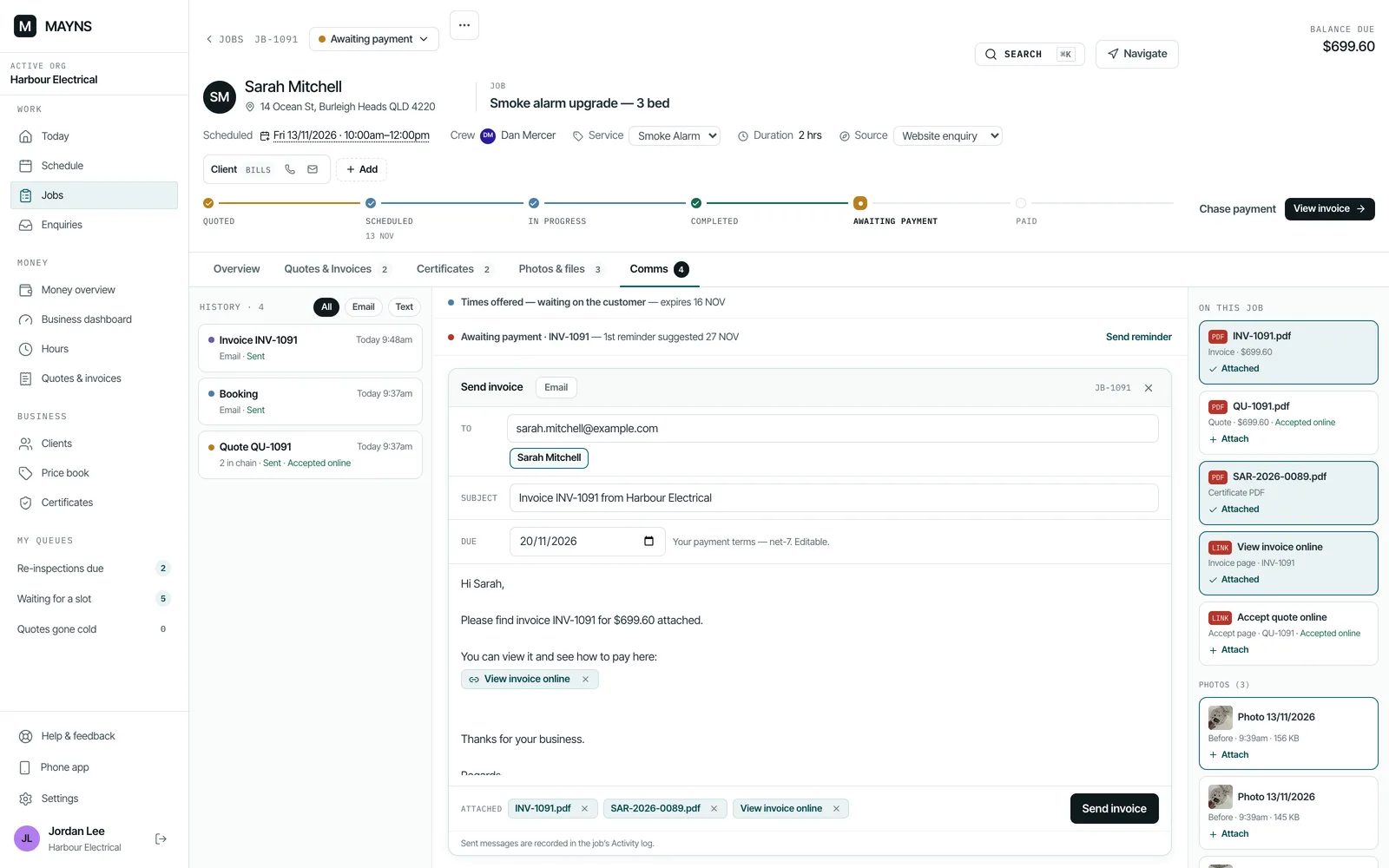
Invoice from the quote. Chased for you.
The invoice comes straight off the accepted quote, with any deposit taken off. It goes to Sarah with the certificate attached. Overdue invoices get reminders at 7, 14 and 30 days overdue, which you can switch off, and invoices and payments go to Xero.
Built for the office and the van.
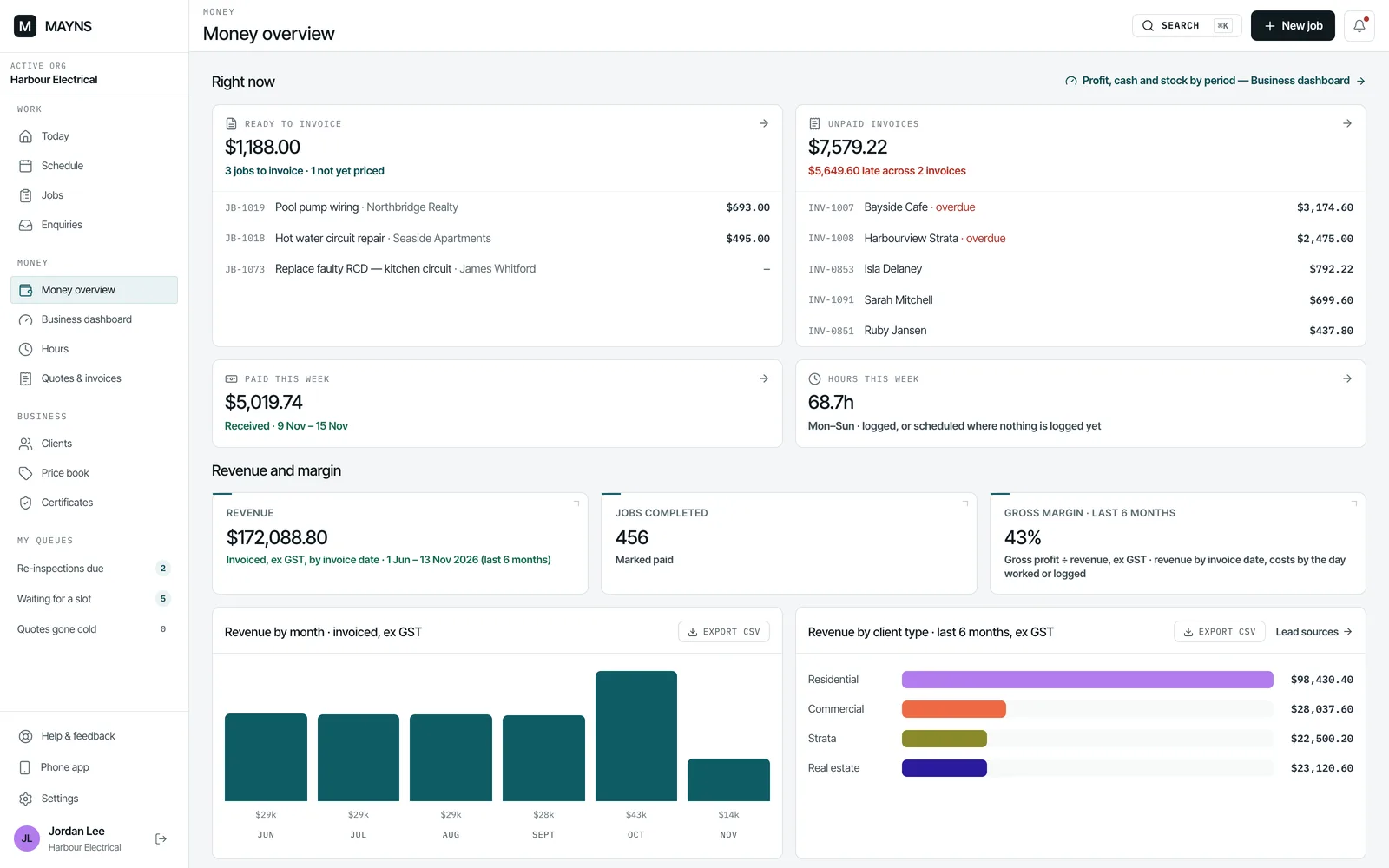
The office on the computer
The crew on their phones
You decide who sees what
Getting set up.
Do it yourself, at your own pace. Stuck on something? Email us.
- Pick your trade — electrical, smoke alarms, plumbing, air conditioning, painting, cleaning, landscaping, handyman, pest control, pool service or another — and start with a list of common services for it. You set the prices.
- Bring your clients in from a spreadsheet, or straight from Xero.
- Add your logo, ABN, licences and bank details once.
- Invite the crew.
Your data
Is my data safe?
Backed up
Who can see it
Where it's kept
Take all of it with you
If you leave
If something's wrong
Free until the beta ends. Then A$49 a month, inc GST, for up to 10 people, and A$5 a month for each person after that. Prices may change, with notice.
Pricing in fullQuestions
Is it really free?
Yes, while we're in beta. No card is needed to join. When the beta ends: Then A$49 a month, inc GST, for up to 10 people, and A$5 a month for each person after that. Prices may change, with notice.
Is there a contract?
No. Stop any time. An owner can download everything first, from Settings.
Does it work on iPhone and Android?
Yes, in the phone's browser. Add it to the home screen and it opens like an app. It isn't in the App Store or Google Play yet.
Do I need Xero?
No. If you use Xero, connect it: invoices, payments, supplier bills and contacts go across. QuickBooks is built but not switched on yet, and MYOB isn't built.
What works with no signal?
Once a phone has opened them with signal, today's and tomorrow's jobs (up to 15) stay on it, with their photo thumbnails, certificates and billing pages.
With no signal you can still clock on and off, mark on the way, arrived and done, add notes, tick tasks, take photos, record a payment and start a certificate. It's all saved on the phone and sent when you're back in range.
Some things need signal: a new job, a deposit invoice, a customer signing a variation, and the office money lists.
Do texts to customers cost extra?
No. A text opens your phone's own messages app with the words filled in, so it comes from your number and Mayns doesn't charge for it. If you connect your own text account, texts go through that instead.
Where is my data kept?
The app, its database and your files are in Sydney. More on your data, or read the privacy policy.
Get in touch
Questions before you join, or help once you have? Email hello@mayns.com.au.
Try it on your next job.
Free during the beta. No card needed.